The CDC came up with a great idea to engage students in how to protect themselves from a potential outbreak. This interactive app allows the user to be the detective to solve the outbreak of fun cases. Ask people questions, look at the scenario and determine the best idea. Do you quarantine, talk to the sick, get test results. Cases come out daily, so this app is always changing.
Your decisions determine how well you can evaluate the situation, which in return provides you with a badge and detective score worthy of how well you handled the situation.
Talking about germs? Diseases? Have a teachable moment? This app can help engage students and allow for some great discussions on the fields of science and health.
Stay Effective!
Don't miss out, add us or subscribe today.
Our students are widening the gap in technology use. I intend to keep the gap from getting any wider through blogging on technology.
Showing posts with label Free. Show all posts
Sunday, April 28, 2013
App Review - MyScript Calculator
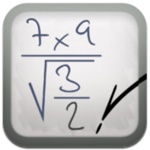
MyScript Calculator is an amazing app/calculator. The idea is that you write with your fingers the problems and the calculator will convert your handwriting into numbers and math signs and then solve it for the answer. You can do algebra with the idea that every time you see an "x", instead leave the space blank. Yes, this does trig operations and a lot more.
As a math teacher I find this very engaging and fun to use and as a programming I am amazed at the apps ability to convert handwriting to actual numeric numbers. I can't imagine the difficulties of handwriting recognition, but recognize it's impressive feat. Now, I don't in any way indulge in the fact that this should be used all the time, it is important students can handle the math on their own as well, but this is just a fun app you can play around with from time to time.
Enjoy and get handwriting.
Stay Effective!
Don't miss out, add us or subscribe today.
Enjoy and get handwriting.
Stay Effective!
Don't miss out, add us or subscribe today.
Wednesday, April 24, 2013
App Review - DailyArt
Daily Art is a wonderful art app that provides the user with one classic art each day. This is a wonderful way to introduce students to art besides their own. Use this as a way to teach new styles, open up discussions about what the painting does for the people who look at it. Use it as a warm-up, have your iPad sitting out with the app open (use guided access, see guided access post if curious about protecting your iPad). The warm-up could be the classical art makes me feel, I believe this art was made to..., The use of the color in this artwork..., I wonder why the artist decided to... There are tons of different ways you can get students thinking with a little bit of exposure to different paintings and artwork and this app does the hard part for you, finding artwork to share each day.\
The app also gives you background behind the artwork as well as any information about the artist who made the artwork. After exposing this information, you could then hold another discussion about why the painting was made again after know some of the artist's background.
Stay Effective!
Don't miss you, follow or subscribe today!
Labels:
Art,
educational technology,
Elementary,
Free,
high,
iPad,
iPod,
middle,
School,
Teacher Tool,
Teaching,
Technology
Monday, April 22, 2013
App Review - 3D Sun
3D Sun is an app from NASA to inform the users of incoming things to watch for on the sun, including solar flares. This app provides detailed and up-to-date pictures of our beloved star, including when special solar events happen including auroras and gas explosions.
I absolutely love everything that NASA provides, as math teacher, I use a lot of NASA's math work to challenge students in scientific notation and other mathematical properties. NASA provides a lot for education, if teachers are willing to use it.
This app can be used to promote science and how the sun changes over time and is more than just a stationary object that provides heat and light to this world.
Stay Effective!
Don't miss out, follow or subscribe today!
I absolutely love everything that NASA provides, as math teacher, I use a lot of NASA's math work to challenge students in scientific notation and other mathematical properties. NASA provides a lot for education, if teachers are willing to use it.
This app can be used to promote science and how the sun changes over time and is more than just a stationary object that provides heat and light to this world.
Stay Effective!
Don't miss out, follow or subscribe today!
App Review - Leafsnap HD
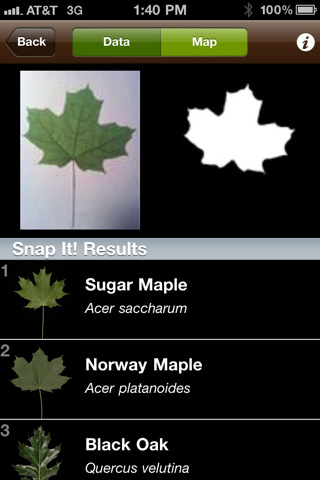
The federal government is responsible for this app coming to be with the Smithsonian taking charge of the app with the assistance from two Universities.
This app provides a wonderful way to identify trees from the leaves. Simply take a leaf, put it behind a white background (take a piece of paper with out) and in moments, the app can determine the most probable type of tree it came from.
This field guide provides samples of the leaves, bark, seeds, flowers, and fruit from that plant. This can be an awesome activity that would surely engage students. Have the leaf samples around your room, have the students use their diagrams to predict the type of tree, then check yourself by scanning the leaf. You can even set it as a challenge to see if the app made a mistake or not.
Stay Effective!
Don't miss out, follow or subscribe.
Sunday, April 21, 2013
App Review - Sentence Builder
Sentence Builder is an app that costs $4.99, but you sure get a lot of interaction out of it and can serve multiple uses.
The general idea is that you will be given a picture and from that picture you must put the words given to you in the correct order to make a sentence reflecting the picture. If there are three boys, some of the words choices would be two and three, which causes the student to think about the scenario and apply deeper thinking.
This can be great for students in elementary school to help students build sentences and interpret scenes. An additional idea could be for students that are just beginning to learn the language. (They have additional language apps that do the same ideas.) English Language Learners will enjoy the simplicity of the app, while using pictures to make sense of the words given to them. This app can provide a lot of problem solving strategies to help these students grow in their knowledge of the language. Take a look, save on a wish list and wait for a sale, but this app provides a lot more than the money it asks.
Stay Effective!
Don't miss out, follow or subscribe.
The general idea is that you will be given a picture and from that picture you must put the words given to you in the correct order to make a sentence reflecting the picture. If there are three boys, some of the words choices would be two and three, which causes the student to think about the scenario and apply deeper thinking.
This can be great for students in elementary school to help students build sentences and interpret scenes. An additional idea could be for students that are just beginning to learn the language. (They have additional language apps that do the same ideas.) English Language Learners will enjoy the simplicity of the app, while using pictures to make sense of the words given to them. This app can provide a lot of problem solving strategies to help these students grow in their knowledge of the language. Take a look, save on a wish list and wait for a sale, but this app provides a lot more than the money it asks.
| The difficulty can change to challenge students. |
Stay Effective!
Don't miss out, follow or subscribe.
Saturday, April 20, 2013
App Review - Essential Skeleton
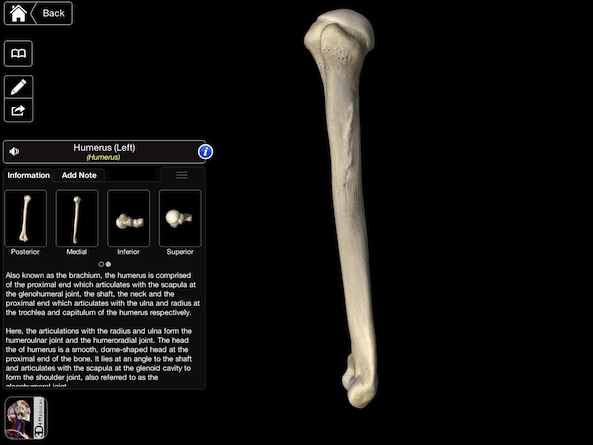
Essential Skeleton is a free app that allows the user to really go into detail about the human body. This app is appropriate for both middle and high school.
In middle school, you can talk about how the bones work together to cause a function. The app provides an easy way to tap on bones after rotating to see all the angles of it and then learn the names for each bone. Students can have fun exploring the body and begin to ask those important questions such as how does the human body work?
In high school, if you offer a biology/anatomy and physiology app then this would be an amazing way to investigate the human body. Students can zoom in and out of what they are looking at, draw pictures and diagrams and fill out notes without the teacher giving the students a slide or having to explain a lot, students will be involved and active in their own learning.
Stay effective!
Don't miss a post, follow or subscribe!
In middle school, you can talk about how the bones work together to cause a function. The app provides an easy way to tap on bones after rotating to see all the angles of it and then learn the names for each bone. Students can have fun exploring the body and begin to ask those important questions such as how does the human body work?
Stay effective!
Don't miss a post, follow or subscribe!
Labels:
anatomy and physiology,
App,
Apple,
Bones,
classroom,
educational technology,
Free,
IOS,
iPad,
iPod,
Science,
Technology
Subscribe to:
Posts (Atom)