This is just a quick note. Currently, I am assessing student growth through multiple measures. One of the measures is retention on vocabulary they haven't heard of before. The first two chapters, I gave each student a piece of paper with a pre and a post test on it. They did the pre-test first, then take the post-test later. I scan over the pre-test to see which words students knew already. Afterwards, I use this for my planning. After the chapter they take the post assessment that counts as a quiz grade. After an hour or two of grading I then need to input my data to make some calculations.
For chapter 3, I tried something differently. I made a google form that has a list of the vocabulary, when students answer the form, they get an immediate score...no more grading for me! Instead, I can focus that hour on analyzing the data, seeing common answers, mistakes, and recording growth. This is a prime example of how we can use technology to improve our lessons...
What if you don't have a class set of computers or tablets? Well you can have 4 or 5 devices and do station work and one of the stations could be to take the vocabulary assessment.
To make a google form, you go to your google drive and select to make a new form. After that the directions are very straight forward.
Stay Effective!
Showing posts with label Technology. Show all posts
Showing posts with label Technology. Show all posts
Wednesday, October 23, 2013

Monday, October 21, 2013
University of Delaware iPad Conference
This past Saturday I had the privilege to present at an iPads in Education conference. The conference started out with a keynote speaker, a former professor at Millersville University, and currently a top executive at Apple.
He shared a multitude of points and thoughts. First he showed how the ability to be connected was growing. There was a graph and somewhere in 2013, the amount of used using a non-mobile device for the internet will equal the amount of mobile devices (Note laptops count as non-mobile).
He continued to talk about the role of teachers. He stated that teachers were once important for their information, but now days the information is out in the world already and that teachers are no longer an essential step for content. Instead teachers need to build relationships with students and guide them through their own education. This is a really neat model, that I hope to develop into more as I progress in my teaching. He then talked about how technology is great, but it is not a replacement to education, but a tool that can be used. Lastly he added that schools should not have a 1 to 1 iPad initiative, but rather a 1 to 1 student initiative with technology. He feels education wants to brag about having the best technology without regards to what the students need to be successful.
After the keynote speaker, I held one of the few sessions available immediately afterwards. In my presentation we discussed using technology to facilitate a dynamic classroom that meets the needs of the students. We discussed various apps that can be used, including the several I have developed, "WileD Math". Along with that, teachers learned some neat tricks such as guided access and other things we can do on our iPads to make them usable and safe in the classroom.
I also attended other sessions, such as using the iPads to make claymations, using the website TodaysMeet, to facilitate a classroom discussion without talking, but typing. Other sessions shared apps they use in the classroom, as well as how to flip the classroom using the website Edmodo (which is a very neat website that I will blog about next!).
Back to Business
The current intentions of this blog is to post once a week a significant post on a technology we can use, a smaller post once a week sharing some simple strategies to try in the classroom, and an app review of an app that is under the education branch of the app store. If you have an app or want an app reviewed, feel free to let me know!
Stay Effective!
He shared a multitude of points and thoughts. First he showed how the ability to be connected was growing. There was a graph and somewhere in 2013, the amount of used using a non-mobile device for the internet will equal the amount of mobile devices (Note laptops count as non-mobile).
He continued to talk about the role of teachers. He stated that teachers were once important for their information, but now days the information is out in the world already and that teachers are no longer an essential step for content. Instead teachers need to build relationships with students and guide them through their own education. This is a really neat model, that I hope to develop into more as I progress in my teaching. He then talked about how technology is great, but it is not a replacement to education, but a tool that can be used. Lastly he added that schools should not have a 1 to 1 iPad initiative, but rather a 1 to 1 student initiative with technology. He feels education wants to brag about having the best technology without regards to what the students need to be successful.
After the keynote speaker, I held one of the few sessions available immediately afterwards. In my presentation we discussed using technology to facilitate a dynamic classroom that meets the needs of the students. We discussed various apps that can be used, including the several I have developed, "WileD Math". Along with that, teachers learned some neat tricks such as guided access and other things we can do on our iPads to make them usable and safe in the classroom.
I also attended other sessions, such as using the iPads to make claymations, using the website TodaysMeet, to facilitate a classroom discussion without talking, but typing. Other sessions shared apps they use in the classroom, as well as how to flip the classroom using the website Edmodo (which is a very neat website that I will blog about next!).
Back to Business
The current intentions of this blog is to post once a week a significant post on a technology we can use, a smaller post once a week sharing some simple strategies to try in the classroom, and an app review of an app that is under the education branch of the app store. If you have an app or want an app reviewed, feel free to let me know!
Stay Effective!
Sunday, May 12, 2013
Daily Presentations
As a teacher, I find myself presenting material multiple ways. In algebra, there are lots of different equations and although they use the same math properties, students need to many potential ways the property is used.
Well, this idea comes across in my teaching as well, I often find myself scaffolding and providing the same material multiple times throughout the year, sometimes I go over the material through notes, clickers, power point games, skits, songs, presentations. One great secret to share with you is that if you are in some sort of presenter (ex: power point), sometimes you have some distracting screens that require asking the students to look at you, not the screen, to easy solutions is to hit the B or W key.
By hitting the B, you will black out the screen.
By hitting W, you will white out the screen.
This would then force the students to not stare at the blank screen, but at you.
Stay Effective!
Well, this idea comes across in my teaching as well, I often find myself scaffolding and providing the same material multiple times throughout the year, sometimes I go over the material through notes, clickers, power point games, skits, songs, presentations. One great secret to share with you is that if you are in some sort of presenter (ex: power point), sometimes you have some distracting screens that require asking the students to look at you, not the screen, to easy solutions is to hit the B or W key.
By hitting the B, you will black out the screen.
By hitting W, you will white out the screen.
This would then force the students to not stare at the blank screen, but at you.
Stay Effective!
Friday, April 26, 2013
Effective Flipcams
 |
| Flip cams value can range anywhere from $80 to $500 depending on the quality. |
Many of my students are afraid to be in front of the class for a presentation and quite frankly in Middle School, some lack the maturity to handle a group project and presentation. An idea to help screen the presentation is by having the students record their presentation through the use of a flipcam. Flipcams are extremely nice because you record and then plug in via USB and your computer has a video ready to play. You can screen the videos ahead of time, have questions ready, make a post-test from them, whatever you would like. Plus students can enjoy feeling secluded when making the presentation, but still present to the class. They can do some neat special effects like hiding things off screen and have them float over the screen.
This is one tool that is extremely useful generically in classrooms. You only truly need one camera, because you can schedule when groups get the camera and they can be ready and start filming at the time and do this on a rotation.
Stay Effective!
Don't miss out, follow or subscribe today.
Wednesday, April 24, 2013
App Review - DailyArt

The app also gives you background behind the artwork as well as any information about the artist who made the artwork. After exposing this information, you could then hold another discussion about why the painting was made again after know some of the artist's background.
Stay Effective!
Don't miss you, follow or subscribe today!
Monday, April 22, 2013
App Review - 3D Sun

I absolutely love everything that NASA provides, as math teacher, I use a lot of NASA's math work to challenge students in scientific notation and other mathematical properties. NASA provides a lot for education, if teachers are willing to use it.
This app can be used to promote science and how the sun changes over time and is more than just a stationary object that provides heat and light to this world.
Stay Effective!
Don't miss out, follow or subscribe today!
Saturday, April 20, 2013
App Review - Essential Skeleton

In middle school, you can talk about how the bones work together to cause a function. The app provides an easy way to tap on bones after rotating to see all the angles of it and then learn the names for each bone. Students can have fun exploring the body and begin to ask those important questions such as how does the human body work?
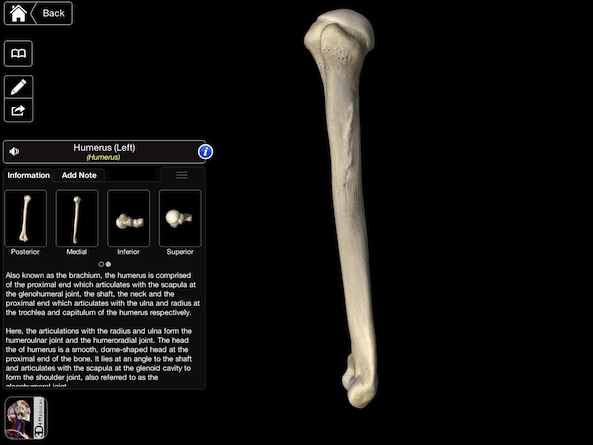 In high school, if you offer a biology/anatomy and physiology app then this would be an amazing way to investigate the human body. Students can zoom in and out of what they are looking at, draw pictures and diagrams and fill out notes without the teacher giving the students a slide or having to explain a lot, students will be involved and active in their own learning.
Stay effective!
Don't miss a post, follow or subscribe!
Wednesday, April 17, 2013
Being Prepared...Technology Malfunctions
One of the biggest issues with technology is the risk factor of things not working. On multiple accounts, I have had a lot happen to me.
One day, my smartboard stopped working with my computer, I was forced to write on a side whiteboard, because I couldn't work on the board. Basically I had my class turn their desks to face the side of my room and I went with the flow.

Another time my LCD projector's bulb burned out. It made the loudest pop possible and was out of commission for several days. I was lucky enough to have our tech person sign me out another projector in which I rigged it to a card table, but with cable restrictions, it was angled oddly at my board. Did it work...yes, was it the desirable...no...actually my eyes would hurt from the angle alone.
Sometimes my iPad is having issues syncing to my computer and it requires that I teach at the front of the room. Sometimes one of the clickers I use doesn't work and I have to give a student a paperclick to click in their answers.
Flexibility is the name of the game when it comes to technology. It is great to have, but you can't always count on it working. Ever need to make a copy and the copier was down? You managed to get through that day somehow.
I recommend some generic back-up plans in case you need something to fall back to. I respect my students enough to ensure that they are always engaged and learning from bell to bell. Often, I take old state tests and convert them to mini-station activities that students can participate in. I also make my own questions, print them on colored construction paper and call it the rainbow activity, where the students must collect one of each color and make a rainbow (done by answering questions)
Having a back-up is essential. To wrap-up, usign technology effectively is important, but also using your time effectively is just as important, being prepared with some back-up activities will make or break your use as an effective and innovative educator.
As always,
Stay Effective!
Don't miss you, follow or subscribe via e-mail to stay up to date!
One day, my smartboard stopped working with my computer, I was forced to write on a side whiteboard, because I couldn't work on the board. Basically I had my class turn their desks to face the side of my room and I went with the flow.
Another time my LCD projector's bulb burned out. It made the loudest pop possible and was out of commission for several days. I was lucky enough to have our tech person sign me out another projector in which I rigged it to a card table, but with cable restrictions, it was angled oddly at my board. Did it work...yes, was it the desirable...no...actually my eyes would hurt from the angle alone.
Sometimes my iPad is having issues syncing to my computer and it requires that I teach at the front of the room. Sometimes one of the clickers I use doesn't work and I have to give a student a paperclick to click in their answers.
Flexibility is the name of the game when it comes to technology. It is great to have, but you can't always count on it working. Ever need to make a copy and the copier was down? You managed to get through that day somehow.
 |
| Activities can be spiced up by creating an objective |
Having a back-up is essential. To wrap-up, usign technology effectively is important, but also using your time effectively is just as important, being prepared with some back-up activities will make or break your use as an effective and innovative educator.
As always,
Stay Effective!
Don't miss you, follow or subscribe via e-mail to stay up to date!
Appropriate times for calculators
As a math teacher I am constantly fighting with myself when is it appropriate to have the students use a calculator? On one hand, the state test for my students allows the students to use a calculator on the entire test, this is the first math test where that is the case. Is there an expectation that at this point the students should only do things through their calculator or is the state assuming that they have the basic skills to get by without a calculator when needed? I just feel with so much uncertainty, that there may not be a correct answer.
Personally my stance is that students need to learn how to do something the most in depth way, before they take any type of shortcut. For example, in graphing, my students learn to plot a graph through a table. Only after plotting from a table and practicing and learning about the idea of slope, do I present a new way to graph by putting a point on the y-intercept and then using the slope to count to the next spot on the graph. Students are then encouraged to do the problems the way they would prefer, most opt for the shortcut, but a few will still choose to use the table.
I will then transfer this idea to calculators. Students should be able to see by hand how to square something before they just do it on the calculator. Not for any other reason than learning and understanding the concept, rather than just memorizing what to push. I want my students to leave my room, not knowing how to push buttons, but how to problem solve. I want them to have a process learned in algebra, so that when an algebraic problem comes their way and it is different from the ones we did in class, that they will be able to apply the properties logically and achieve a correct answer.
How can we go deeper in mathematics, if we only provide a superficial learning to our students?
Effective technology is not just about sharing ideas on how to implement technology, but it is also about the technology used in the classroom.
When you allow the use of a calculator, ask yourself why you are doing it. Is it so the student can show they know what buttons to push or do you want to see them apply what they have learned?
As always,
Stay Effective!
Don't miss a post, follow us or sign-up for an e-mail subscription.
Personally my stance is that students need to learn how to do something the most in depth way, before they take any type of shortcut. For example, in graphing, my students learn to plot a graph through a table. Only after plotting from a table and practicing and learning about the idea of slope, do I present a new way to graph by putting a point on the y-intercept and then using the slope to count to the next spot on the graph. Students are then encouraged to do the problems the way they would prefer, most opt for the shortcut, but a few will still choose to use the table.
I will then transfer this idea to calculators. Students should be able to see by hand how to square something before they just do it on the calculator. Not for any other reason than learning and understanding the concept, rather than just memorizing what to push. I want my students to leave my room, not knowing how to push buttons, but how to problem solve. I want them to have a process learned in algebra, so that when an algebraic problem comes their way and it is different from the ones we did in class, that they will be able to apply the properties logically and achieve a correct answer.
How can we go deeper in mathematics, if we only provide a superficial learning to our students?
Effective technology is not just about sharing ideas on how to implement technology, but it is also about the technology used in the classroom.
When you allow the use of a calculator, ask yourself why you are doing it. Is it so the student can show they know what buttons to push or do you want to see them apply what they have learned?
As always,
Stay Effective!
Don't miss a post, follow us or sign-up for an e-mail subscription.
Monday, April 15, 2013
iPad Apps - High School
Locating math apps for the high school can be rather difficult with such a variety of math classes and the fact that most of the high school math apps feature very little on the engaging game side, but rather focus strictly on practicing math problems on a topic. I have come across a couple math apps worthy of discussing and sharing.
 Math Formulas - Reference Guide: This app provides a list of nearly 100 different formulas in 1 easy place that can be sorted and used in class on an as needed basis. I am mentioning this app as I feel that students being able to determine what formula they need to use is a key skill when trying to develop those problem solving and logical reasoning skills.
 KineMath - This is an incredibly powerful app for graphing equations. Graphing can be quite a difficult journey for students when it comes to some of those more complex graphs or when trying to figure out what does what to an equation, such as when I have a quadratic equation, what does a number inside the parenthesis do versus outside of it? I see this app as such an amazing way to investigate properties of lines. Plus it is extremely touch interactive.

 The last app is dedicated to those sophemores and juniors looking to take the SAT's.

The Easel series features SAT prep, algebra, and other topics that can help prepare students for their math tests coming up. These apps cost a little money, but if you were planning on buying an SAT review book, this could be an alternative solution that provides a lot of problems to work on.
 Graphing Calculator - I just wanted to add this app so that you can consider if in a school with iPads already to save some money and simply get a graphing calculator app for $0.99 and perhaps use that money to buy a class set of iPads.

Stay Effective!
Like these posts? Feel free to follow or subscribe to avoid missing one!
Sunday, April 14, 2013
iPad Math Apps - Middle School
Searching for quality elementary school math apps are rather easy. It always appeared to me that finding quality apps for the middle school is better described like a black-hole, you know they could be out there, but no matter how hard you look, you can never find them. Today we will be taking a look at several math apps that can be used for multiple lessons or topics. I will go over what topics it can cover, nice perks to the app, as well as anything special such as why should you choose this app over that app.

 WileD Math - I designed this app intentionally for teachers to use in the classroom to motivate students to learn to answer questions correctly. The app covers 36 topics including algebra, geometry, graphing, inequalities, algebraic properties, percent problems, fractions, and many other categories. As you answer questions you can earn credits to play little mini-games as a reward. Students love to compete against each other in the mini-games to see who can score the most points. A lot of the topics feature technology enhanced topics such as plotting the inequality, shading, and determining an open or closed point. Another technology enhanced topic involves picking two angles that meet a certain geometric definition. My students love using this app and enjoy the days we get on the iPad. Students are asked to complete so many questions correctly for credit for the day in class or take a "mini"-quiz on it then earn the credits. The app also features a variety of options, including a tag mode that allows the user to e-mail their tag score to a teacher or someone else. This app is currently free for download on the app store.
 Numbler - This is a really neat app that works on the orders of
operations scrabble style. Working on number sense, this is an app to
try. Note there is still some orders of operation improvements needed for this app.
Numbler - This is a really neat app that works on the orders of
operations scrabble style. Working on number sense, this is an app to
try. Note there is still some orders of operation improvements needed for this app.
Math 7 and Math 8 -These games are made for that particular grade level in which your goal is to move a monkey as high as possible up the screen. As you move up the screen you earn more points. After so much time you must answer some math questions on some more basic middle school math, after answering correctly you are given more time to move your monkey higher up the screen. Simple, but effective!
My last App I am going to share tonight seems more like a fun app, but I am going to provide some uses with respect to geometry and mathematical observations.
LestTans Cls - This is a wonderful tangram app. Now tangrams in itself can help students recognize how perimeter can change even if the area doesn't. I challenge all of you teachers out there to do an activity where students investigate this concept by using the same shapes but build different objects. Afterwards students add up the perimeter (perhaps give measurements of all sides of each tile on the board). Afterwards you can have a discussion about their observations of area and perimeter!
Stay Effective!
Like these posts? Feel free to follow or subscribe to avoid missing one!

 WileD Math - I designed this app intentionally for teachers to use in the classroom to motivate students to learn to answer questions correctly. The app covers 36 topics including algebra, geometry, graphing, inequalities, algebraic properties, percent problems, fractions, and many other categories. As you answer questions you can earn credits to play little mini-games as a reward. Students love to compete against each other in the mini-games to see who can score the most points. A lot of the topics feature technology enhanced topics such as plotting the inequality, shading, and determining an open or closed point. Another technology enhanced topic involves picking two angles that meet a certain geometric definition. My students love using this app and enjoy the days we get on the iPad. Students are asked to complete so many questions correctly for credit for the day in class or take a "mini"-quiz on it then earn the credits. The app also features a variety of options, including a tag mode that allows the user to e-mail their tag score to a teacher or someone else. This app is currently free for download on the app store.
 Numbler - This is a really neat app that works on the orders of
operations scrabble style. Working on number sense, this is an app to
try. Note there is still some orders of operation improvements needed for this app.
Numbler - This is a really neat app that works on the orders of
operations scrabble style. Working on number sense, this is an app to
try. Note there is still some orders of operation improvements needed for this app.Math 7 and Math 8 -These games are made for that particular grade level in which your goal is to move a monkey as high as possible up the screen. As you move up the screen you earn more points. After so much time you must answer some math questions on some more basic middle school math, after answering correctly you are given more time to move your monkey higher up the screen. Simple, but effective!
My last App I am going to share tonight seems more like a fun app, but I am going to provide some uses with respect to geometry and mathematical observations.
LestTans Cls - This is a wonderful tangram app. Now tangrams in itself can help students recognize how perimeter can change even if the area doesn't. I challenge all of you teachers out there to do an activity where students investigate this concept by using the same shapes but build different objects. Afterwards students add up the perimeter (perhaps give measurements of all sides of each tile on the board). Afterwards you can have a discussion about their observations of area and perimeter!
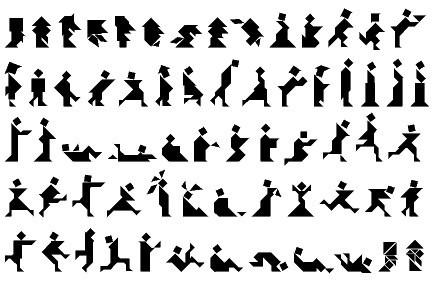 | ||
| With Tangrams, the objects you can make are endless! |
Stay Effective!
Like these posts? Feel free to follow or subscribe to avoid missing one!
Saturday, April 13, 2013
iPad Math Apps - Elementary
Looking for some top notch math apps for elementary schools? Today we will be taking a look at some apps that are free and some that are worth the money.
1) Math Grade 1-4: kids practice fun - trainer for elementary school. This app provides a lot of wonderful visuals when practicing your operations of multiple digits. There are a variety of math problems included in this app including money arithmetic, reading and interpreting time, as well as fun mini-games that you can play. The mini-games are earned after working out so many problems and are considered a fun reward. This app is free to download, but the in-app purchases allow you to buy what grade levels you would like to use, so if you are using it for only one grade level, you can pick and choose what math to buy.
2) Math Adventure with Fast Facts: This app is currently free (for a limited time) and provides some entertaining ways to practice your math operations. There are multiple levels to choose from and a parent mode that is to provide some wonderful bonding with your child as you can compete together. This app also has in-app purchases which opens up various levels of the math facts for $1.99 each.
 3) The Motion Math Series: I absolutely love the motion math series. This series provides a free version and then a version you can pay for that unlocks everything.
Motion math has the following games available.
a) Hungry Fish - Feed the fish by putting number bubbles together to get to the number the fish wants to eat. As you feed the fish, it will get bigger until it is so big that the game is over and you move to the next level. If you don't feed it fast enough, the fish will shrink and shrivel out of existence.
 b) Zoom - This is an extremely interactive way to use the number line. I love it for my students as well, because it really requires students to understand how numbers are lined up in order. As you zoom in and out, various animals are between the numbers, the more you zoom in the more the animals are naturally smaller to get you the idea you zoomed in. As you progress in levels you start with integers and can eventually move into more challenges such as decimals and negative numbers. Filling in the number line has never been so much fun!
c) Wings - Wings is an expansion on one main operation, multiplication. I abosultely enjoyed using this as it provides not just one way, but multiple visuals to multiply numbers together. I feel this app would have a lot of potential in showing students why we can multiple, how grouping works. As you answer questions you can earn feathers to customize your bird's wings. The different visuals of multiplication that this app provides are: rows of dots, clusters of dots, groups of dots, a grid, a labelled grid, and through the use of symbols.
As a middle school teacher, I really appreciate apps that help students understand what a fraction represents. To this day, I feel most students are afraid of fractions and try to put everything to a decimal. Well, when teaching various degrees of math such as slope, a decimal would be a lot harder to work with than a fraction, so I always look for apps to help students relate better with fractions.
 4) Pizza Fractions: Beginning with Simple Fractions - is a wonderful way to start. The idea of the app is that you have only so much of a pizza left and you have to count how many slices are there out of how many slices were originally there. After completing a round you are given an overall score which is based off of how long it took to answer the questions as well as how accurate you were.
5) Fraction Math - is an app that allows students to practice each step of the problem until you get the correct answer. This is a wonderful idea, because it holds students accountable for showing all of the steps along the way for the problem.
 6) Motion Math HD - Fractions!: This is another one of motion maths great apps that involve fractions. This app for $2.99 has students placing fractions on various parts of a number line...what an amazing application to fractions and have number sense. Students see shapes falling to the ground and need to put the shape in close proximity to where the fraction would belong. There are a variety of levels and difficulties to challenge even the top students. Some levels require you to determine if a fraction is less than, equal, or more than another fraction!
As always, we will continue to provide you more apps for math in the coming days, our next post will feature math apps for the middle school, then for the high school. Want some apps for your subject? Post a comment and perhaps your request will be the next series of posts!
Stay Effective!
1) Math Grade 1-4: kids practice fun - trainer for elementary school. This app provides a lot of wonderful visuals when practicing your operations of multiple digits. There are a variety of math problems included in this app including money arithmetic, reading and interpreting time, as well as fun mini-games that you can play. The mini-games are earned after working out so many problems and are considered a fun reward. This app is free to download, but the in-app purchases allow you to buy what grade levels you would like to use, so if you are using it for only one grade level, you can pick and choose what math to buy.
2) Math Adventure with Fast Facts: This app is currently free (for a limited time) and provides some entertaining ways to practice your math operations. There are multiple levels to choose from and a parent mode that is to provide some wonderful bonding with your child as you can compete together. This app also has in-app purchases which opens up various levels of the math facts for $1.99 each.
 3) The Motion Math Series: I absolutely love the motion math series. This series provides a free version and then a version you can pay for that unlocks everything.
 Motion math has the following games available.
a) Hungry Fish - Feed the fish by putting number bubbles together to get to the number the fish wants to eat. As you feed the fish, it will get bigger until it is so big that the game is over and you move to the next level. If you don't feed it fast enough, the fish will shrink and shrivel out of existence.
 b) Zoom - This is an extremely interactive way to use the number line. I love it for my students as well, because it really requires students to understand how numbers are lined up in order. As you zoom in and out, various animals are between the numbers, the more you zoom in the more the animals are naturally smaller to get you the idea you zoomed in. As you progress in levels you start with integers and can eventually move into more challenges such as decimals and negative numbers. Filling in the number line has never been so much fun!
c) Wings - Wings is an expansion on one main operation, multiplication. I abosultely enjoyed using this as it provides not just one way, but multiple visuals to multiply numbers together. I feel this app would have a lot of potential in showing students why we can multiple, how grouping works. As you answer questions you can earn feathers to customize your bird's wings. The different visuals of multiplication that this app provides are: rows of dots, clusters of dots, groups of dots, a grid, a labelled grid, and through the use of symbols.
As a middle school teacher, I really appreciate apps that help students understand what a fraction represents. To this day, I feel most students are afraid of fractions and try to put everything to a decimal. Well, when teaching various degrees of math such as slope, a decimal would be a lot harder to work with than a fraction, so I always look for apps to help students relate better with fractions.
 4) Pizza Fractions: Beginning with Simple Fractions - is a wonderful way to start. The idea of the app is that you have only so much of a pizza left and you have to count how many slices are there out of how many slices were originally there. After completing a round you are given an overall score which is based off of how long it took to answer the questions as well as how accurate you were.
5) Fraction Math - is an app that allows students to practice each step of the problem until you get the correct answer. This is a wonderful idea, because it holds students accountable for showing all of the steps along the way for the problem.

As always, we will continue to provide you more apps for math in the coming days, our next post will feature math apps for the middle school, then for the high school. Want some apps for your subject? Post a comment and perhaps your request will be the next series of posts!
Stay Effective!
Thursday, April 11, 2013
The Clicker Games
In our previous posts, we have discussed using clickers for the educational stand point of effective data and how to appropriately use our clickers to engage students through formal assessments.
Let's not take a look at some ideas of how we can incorporate clickers into lessons, reviews, and games.
For English/Writing
 Ideas modified from games I enjoy. This one is similar to apples to apples, but somewhat in reverse. Have on the board the ability to select Option 1 through Option (however many groups you want) + 1.
Call out a word that the students do not know and each group is responsible for writing a definition for that word similar to how a dictionary would write it. The teacher at this time also writes on a card the correct definition. The teacher then reads all the definitions in an order and each individual student chooses which definition (based on the options) is the best one. Students choosing the correct one can score a point and to promote higher thinking, students that's option was selected most also earns a point.
Most Subjects
At the summer camp I work at during summers, we also introduced our staff using two truths and a lie, where you share two things that are true and one that is a lie and the group has to try to guess what the lie is. Clicker version means that you give each student a question and they are responsible for writing things about that topic or question where 2 of them are true and 1 is false. You can then read them out loud and students will choose 1, 2, or 3 as the lie. In math I can see this useful with properties of shapes such as angles, congruent sides and so on.
Review Game
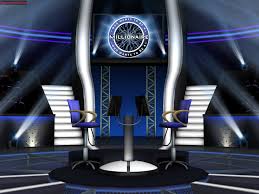 Ever watch the show 1 vs 100? Basically, a question is asked, the crowd answers it and if the one person can't answer the question then the crowd wins the money. In this version you can have one lucky student answer the questions in the front of the room like a game show host, then the crowd could answer then the one person answers. Winners earn whatever prize you might have.
Every watch who wants to be a millionaire? Well you can do the same idea similar to 1 vs 100 except that the objective as a whole is to get to the million dollar question, so when asking the crowd the students want to help as much as possible.
In the end, there are a lot of options out there when it comes to clickers and activities you can do with them. Clickers are great for getting quick data on where your students are at or if a lesson worked the way it was planned. Clickers are naturally engaging and provide a sort of "reset" when changing the pace of the class. If you have not yet used these great devices, I encourage all to give them a try.
Yes, if requires a bit of work to set up and get the slides working properly, but if you make them well enough, making the slides could be a simple 1 time thing.
Stay Effective!
Let's not take a look at some ideas of how we can incorporate clickers into lessons, reviews, and games.
For English/Writing
Call out a word that the students do not know and each group is responsible for writing a definition for that word similar to how a dictionary would write it. The teacher at this time also writes on a card the correct definition. The teacher then reads all the definitions in an order and each individual student chooses which definition (based on the options) is the best one. Students choosing the correct one can score a point and to promote higher thinking, students that's option was selected most also earns a point.
Most Subjects
At the summer camp I work at during summers, we also introduced our staff using two truths and a lie, where you share two things that are true and one that is a lie and the group has to try to guess what the lie is. Clicker version means that you give each student a question and they are responsible for writing things about that topic or question where 2 of them are true and 1 is false. You can then read them out loud and students will choose 1, 2, or 3 as the lie. In math I can see this useful with properties of shapes such as angles, congruent sides and so on.
Review Game
Every watch who wants to be a millionaire? Well you can do the same idea similar to 1 vs 100 except that the objective as a whole is to get to the million dollar question, so when asking the crowd the students want to help as much as possible.
In the end, there are a lot of options out there when it comes to clickers and activities you can do with them. Clickers are great for getting quick data on where your students are at or if a lesson worked the way it was planned. Clickers are naturally engaging and provide a sort of "reset" when changing the pace of the class. If you have not yet used these great devices, I encourage all to give them a try.
Yes, if requires a bit of work to set up and get the slides working properly, but if you make them well enough, making the slides could be a simple 1 time thing.
Stay Effective!
Wednesday, April 10, 2013
Clickers in the Classroom
Today we are going to be taking a closer look at clickers in the classroom. There are a lot of types of clickers out there and we will go into the details of types of clickers at a later time, but right now I want to focus on the effectiveness of these great devices.
First off, clickers are a simple idea that provides many wonderful opportunities in the classroom. Clickers are designed to give the teacher (and students) instant feedback on his or her understanding of the topic(s). It is an amazing tool because students love being able to point and click to the receiver in the room and love to see if they are doing the problems correctly or know the information.
Clickers can be used for a lot of different ideas. Here are a list of the few main concepts for clickers.
1) A pre and post test that can be done in 10-15 minutes of class to see what students may already know before starting a unit and then be able to see the students' growth from the post clicker test. A bonus is that students don't feel that it is a test and will relax and really show you what they know!
2) Teaching a new topic? Why not incorporate your notes onto a powerpoint or other slideshow that works with the clickers, teach a concept and then have the students use the clickers after a new topic was taught to see if they are understanding. Perhaps provide an award idea that if you maintain an 80% over so many checks that they can earn a ticket towards the iPad time (See the 1 iPad Classroom Series).
3) Use for a review game...how great could it be for ask the audience?
I started using clickers as a way to engage my students longer on math problems. I teach for 90 minutes, middle schoolers and 90 minutes is a long time! When we bring out the clickers, it is like an amazing reset on class, where the students are refreshed and ready to do more problems even though 2 minutes ago they were burnt out.
I run a Funday Friday idea, where we review a previous topic and students receiving above an 80% are considered proficient on that topic and earn some time in our technology room, which features iPads and computers. Students not at that proficient mark work on a mini-lesson with myself that reflects the topic used with the clickers. It is not seen as a punishment, just as a reward which is really neat to experience, plus some topics you can cut your class in half!
Our next blog will feature how to effectively use the data from clickers to assess your teaching abilities and student growth.
First off, clickers are a simple idea that provides many wonderful opportunities in the classroom. Clickers are designed to give the teacher (and students) instant feedback on his or her understanding of the topic(s). It is an amazing tool because students love being able to point and click to the receiver in the room and love to see if they are doing the problems correctly or know the information.
Clickers can be used for a lot of different ideas. Here are a list of the few main concepts for clickers.
1) A pre and post test that can be done in 10-15 minutes of class to see what students may already know before starting a unit and then be able to see the students' growth from the post clicker test. A bonus is that students don't feel that it is a test and will relax and really show you what they know!
2) Teaching a new topic? Why not incorporate your notes onto a powerpoint or other slideshow that works with the clickers, teach a concept and then have the students use the clickers after a new topic was taught to see if they are understanding. Perhaps provide an award idea that if you maintain an 80% over so many checks that they can earn a ticket towards the iPad time (See the 1 iPad Classroom Series).
3) Use for a review game...how great could it be for ask the audience?
I started using clickers as a way to engage my students longer on math problems. I teach for 90 minutes, middle schoolers and 90 minutes is a long time! When we bring out the clickers, it is like an amazing reset on class, where the students are refreshed and ready to do more problems even though 2 minutes ago they were burnt out.
I run a Funday Friday idea, where we review a previous topic and students receiving above an 80% are considered proficient on that topic and earn some time in our technology room, which features iPads and computers. Students not at that proficient mark work on a mini-lesson with myself that reflects the topic used with the clickers. It is not seen as a punishment, just as a reward which is really neat to experience, plus some topics you can cut your class in half!
Our next blog will feature how to effectively use the data from clickers to assess your teaching abilities and student growth.
Sunday, April 7, 2013
The 1 iPad Classroom (Introduction)
 I use my iPad in and out of my classroom on a daily basis. Whether it is going over notes, engaging students, motivating students, or writing my own apps for students to use. Many teachers have asked for my help in using their iPad more effectively in the classroom.
After sharing how I use my iPad, I usually end up showing teachers how to sync your iPad to your computer and teach from it. After helping multiple teachers in my district, I have found myself looking for more ways to effectively use a single iPad in the classroom. This first series of the blog will be covering the following questions.
1) How do I keep it fair when sharing with 20-30 students
2) Are there activities that partners or groups can use an iPad?
3) How do I know students will do what is expected (holding students accountable)?
4) How can I use the iPad to motivate student learning and growth?
4) How can I use the iPad to motivate student learning and growth?
5) I have my personal e-mail set-up on my iPad, how can I make sure the students don't get into my personal account?
What is Effective Technology?
We will be spending a lot of time taking a look at effective technology. I believe before we begin it is important that we take the time to define effective technology.
 When I write about effective technology, I am referring to using technology, not because you can, but because it will enhance your lesson in dynamic ways. Teaching should never be static and technology provides multiple ways to avoid static teaching. Effective technology is all about making life easier in the classroom and keeping students engaged on a topic through interactive, fun, and educational activities.
In this blog, we will be sharing ideas for technology use in the classroom, review of apps for all grade levels and subjects, and share experiences of when technology fails...how you can have easy back-ups in place.
In this blog, we will be sharing ideas for technology use in the classroom, review of apps for all grade levels and subjects, and share experiences of when technology fails...how you can have easy back-ups in place.
Saturday, April 6, 2013
3 Effective Technologies for the Classroom
Mission and Objective: This blog is dedicated to provide opportunities, suggestions, and ideas to help teachers, administrators, and anyone else that believes that effective technology use is key to reaching the new generation of students.
As a teacher myself (Middle School Math), I use technology to free me in the classroom. I use my iPad to teach from the back of the room or anywhere I would like to go. The app that I primarily use to annotate on my iPad to my projector is called SplashTop Whiteboard.

SplashTop Whiteboard
Splashtop allows the user to sync their iPad to their computer (or any computer that is logged in through g-mail.) Every once in a while I leave the file I need on my home computer and in an instant I can log into my computer from school to home and drag the file into dropbox. All of a sudden I can now reach my file from my school computer.
Along with using the iPad to go over notes, I use clickers to assess students with a pre and post test for each chapter. I also create a few questions that go with each set of notes and I can do an instant quick check to see if students are learning.
Clickers provides a lot of feedback in a moments time, which is amazing, depending on what program, it will also spit out a lot of useful data to help you track your students growth. Anyone not using this technology should really consider giving these a try. The initial setup can be a little stressful, but the rewards afterwards pay off that stress extremely fast.
The last effective strategy I will be sharing today is the use of apps. There are some amazing apps out there for math, but I find it hard to find
 engaging math apps that go over the topics discussed in middle school math, including Pythagorean theorem, graphing, algebra, and geometry. I have dedicated the last half of a year creating my very own math app called WileD Math.
WileD Math
This app is designed for students to try those challenging problems and afterwards, the students can spend credits to play the fun little mini-games where the objective is to earn the highest score possible.
 I consider this app an effective use of technology because I can have half of my students working on problems we learned in class and the other half can spend some time one on one with myself, where I can really focus on their math skills or spend time developing a new, more complex skill. The app provides breakdown on student results, which means I can take it out of a grade if I wanted to. Every question on the app is self generating, which means their is an unlimited amount of questions that can occur. Problems are written in multiple ways and the app is currently expanding and meeting needs in all areas.
In short, technology is the way of the generation of students we are having. It is time for teachers to begin adopting effective technology in the room to promote critical thinking and higher levels of engagement. Technology by itself is not beneficial in the classroom, rather technology used in conjunction with sound lessons where the technology provides perks including instant feedback, higher levels of engagement, interactions, or a combination of everything.
As a teacher myself (Middle School Math), I use technology to free me in the classroom. I use my iPad to teach from the back of the room or anywhere I would like to go. The app that I primarily use to annotate on my iPad to my projector is called SplashTop Whiteboard.

| Solving a problem on the iPad, shows up on the board |
Splashtop allows the user to sync their iPad to their computer (or any computer that is logged in through g-mail.) Every once in a while I leave the file I need on my home computer and in an instant I can log into my computer from school to home and drag the file into dropbox. All of a sudden I can now reach my file from my school computer.
| Turning Point Clickers |
Clickers provides a lot of feedback in a moments time, which is amazing, depending on what program, it will also spit out a lot of useful data to help you track your students growth. Anyone not using this technology should really consider giving these a try. The initial setup can be a little stressful, but the rewards afterwards pay off that stress extremely fast.
The last effective strategy I will be sharing today is the use of apps. There are some amazing apps out there for math, but I find it hard to find
WileD Math
This app is designed for students to try those challenging problems and afterwards, the students can spend credits to play the fun little mini-games where the objective is to earn the highest score possible.
In short, technology is the way of the generation of students we are having. It is time for teachers to begin adopting effective technology in the room to promote critical thinking and higher levels of engagement. Technology by itself is not beneficial in the classroom, rather technology used in conjunction with sound lessons where the technology provides perks including instant feedback, higher levels of engagement, interactions, or a combination of everything.
Subscribe to:
Posts (Atom)