Showing posts with label apps. Show all posts

Tuesday, April 16, 2013

Writing Your Own Apps - Codea

Today we will be taking look at a general way to introduce yourself into programming for apple IOS.

In general, to make your own apps, you will need the IOS device you are writing for, a mac computer with operating system Mountain Lion, and an apple developer license for $99.

Today we will be looking specifically at a cheaper way to get a feel for app writing.

Ironically I am referring to an app that allows us to make apps. Codea is an app where if you have an idea, you can put it to code. Codea uses a language called Lua, an objective-c language that is easy to pick-up. When you download Codea you receive an app that allows you to type code and when you hit play, the code executes on your iPad only.

My first experience with Codea was really nice. In minute I had an object following my finger on a screen. In a week I had my first game made entitled "Square Wars". Within a month, I had my first version of my math app in place, in which I later transferred this to my new mac computer and produced the app WileD Math.

Codea has a lot of "tutorial"-like help where you can click on various categories and see how the code works and executes. Codea also has an amazing community. I have received a lot of help as well as given a lot of help when possible. If you have a situation you are stuck at, the forums are a great place to go to get help.

Codea Forums - Check it out


Codea of course has its downsides. There is a lot more work in transferring the code to the mac computer later on and the language provides limitations on what you can do from the iPad until you transfer to the mac and work on it via xCode. Still, I have never felt restricted on what I wanted to do for my app(s) and anything extra I wanted to add, I have been able to do eventually with some frustration and time.

Regardless, Codea provides an amazing opportunity to write some basic programs on your iPad. The makers of Codea have done an amazing job with updates and they are pushing to have Codea do more and more with every update.
Watch the power of Codea here

To all the schools out there:

Have a cart? Download Codea and let your imagination go!
Programming is a logical, mathematical process. From a personal experience, I have never actually applied half the math I have learned in high school except for in programming, such as using trig to determine the angle from a point, and using functions to determine whether or not two objects collide. Math is the key component to code and I really want to encourage schools to see that if you focus on a programming course that perhaps math abilities will improve do to the nature of programming, not to mention the problem solving and the ability to make truly make your own ideas come to life on a screen. If you already have an iPad cart, why not get Codea and have a little iPad programming course to get students interested in computer science.


Monday, April 15, 2013

iPad Apps - High School

Locating math apps for the high school can be rather difficult with such a variety of math classes and the fact that most of the high school math apps feature very little on the engaging game side, but rather focus strictly on practicing math problems on a topic. I have come across a couple math apps worthy of discussing and sharing.

Math Formulas - Reference Guide: This app provides a list of nearly 100 different formulas in 1 easy place that can be sorted and used in class on an as needed basis. I am mentioning this app as I feel that students being able to determine what formula they need to use is a key skill when trying to develop those problem solving and logical reasoning skills.


KineMath - This is an incredibly powerful app for graphing equations. Graphing can be quite a difficult journey for students when it comes to some of those more complex graphs or when trying to figure out what does what to an equation, such as when I have a quadratic equation, what does a number inside the parenthesis do versus outside of it? I see this app as such an amazing way to investigate properties of lines. Plus it is extremely touch interactive.


 The last app is dedicated to those sophemores and juniors looking to take the SAT's.

The Easel series features SAT prep, algebra, and other topics that can help prepare students for their math tests coming up. These apps cost a little money, but if you were planning on buying an SAT review book, this could be an alternative solution that provides a lot of problems to work on.


Graphing Calculator - I just wanted to add this app so that you can consider if in a school with iPads already to save some money and simply get a graphing calculator app for $0.99 and perhaps use that money to buy a class set of iPads.


Stay Effective!

Like these posts? Feel free to follow or subscribe to avoid missing one!  

Sunday, April 14, 2013

iPad Math Apps - Middle School

Searching for quality elementary school math apps are rather easy. It always appeared to me that finding quality apps for the middle school is better described like a black-hole, you know they could be out there, but no matter how hard you look, you can never find them. Today we will be taking a look at several math apps that can be used for multiple lessons or topics. I will go over what topics it can cover, nice perks to the app, as well as anything special such as why should you choose this app over that app.

 WileD Math - I designed this app intentionally for teachers to use in the classroom to motivate students to learn to answer questions correctly. The app covers 36 topics including algebra, geometry, graphing, inequalities, algebraic properties, percent problems, fractions, and many other categories. As you answer questions you can earn credits to play little mini-games as a reward. Students love to compete against each other in the mini-games to see who can score the most points. A lot of the topics feature technology enhanced topics such as plotting the inequality, shading, and determining an open or closed point. Another technology enhanced topic involves picking two angles that meet a certain geometric definition. My students love using this app and enjoy the days we get on the iPad. Students are asked to complete so many questions correctly for credit for the day in class or take a "mini"-quiz on it then earn the credits. The app also features a variety of options, including a tag mode that allows the user to e-mail their tag score to a teacher or someone else. This app is currently free for download on the app store.


Numbler - This is a really neat app that works on the orders of operations scrabble style. Working on number sense, this is an app to try. Note there is still some orders of operation improvements needed for this app.

Math 7 and Math 8 -These games are made for that particular grade level in which your goal is to move a monkey as high as possible up the screen. As you move up the screen you earn more points. After so much time you must answer some math questions on some more basic middle school math, after answering correctly you are given more time to move your monkey higher up the screen. Simple, but effective!


My last App I am going to share tonight seems more like a fun app, but I am going to provide some uses with respect to geometry and mathematical observations.

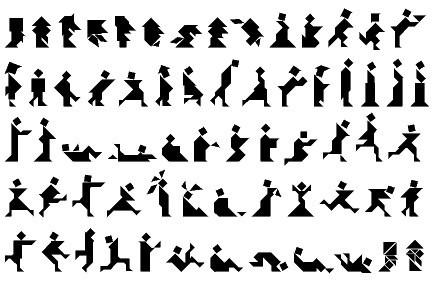
LestTans Cls - This is a wonderful tangram app. Now tangrams in itself can help students recognize how perimeter can change even if the area doesn't. I challenge all of you teachers out there to do an activity where students investigate this concept by using the same shapes but build different objects. Afterwards students add up the perimeter (perhaps give measurements of all sides of each tile on the board). Afterwards you can have a discussion about their observations of area and perimeter!
With Tangrams, the objects you can make are endless!


Stay Effective!

Like these posts? Feel free to follow or subscribe to avoid missing one!

Saturday, April 13, 2013

iPad Math Apps - Elementary

Looking for some top notch math apps for elementary schools? Today we will be taking a look at some apps that are free and some that are worth the money.

1) Math Grade 1-4: kids practice fun - trainer for elementary school. This app provides a lot of wonderful visuals when practicing your operations of multiple digits. There are a variety of math problems included in this app including money arithmetic, reading and interpreting time, as well as fun mini-games that you can play. The mini-games are earned after working out so many problems and are considered a fun reward. This app is free to download, but the in-app purchases allow you to buy what grade levels you would like to use, so if you are using it for only one grade level, you can pick and choose what math to buy.

2) Math Adventure with Fast Facts: This app is currently free (for a limited time) and provides some entertaining ways to practice your math operations. There are multiple levels to choose from and a parent mode that is to provide some wonderful bonding with your child as you can compete together. This app also has in-app purchases which opens up various levels of the math facts for $1.99 each.

3) The Motion Math Series: I absolutely love the motion math series. This series provides a free version and then a version you can pay for that unlocks everything.

    Motion math has the following games available.
    a) Hungry Fish - Feed the fish by putting number bubbles together to get to the number the fish wants to eat. As you feed the fish, it will get bigger until it is so big that the game is over and you move to the next level. If you don't feed it fast enough, the fish will shrink and shrivel out of existence.

b) Zoom - This is an extremely interactive way to use the number line. I love it for my students as well, because it really requires students to understand how numbers are lined up in order. As you zoom in and out, various animals are between the numbers, the more you zoom in the more the animals are naturally smaller to get you the idea you zoomed in. As you progress in levels you start with integers and can eventually move into more challenges such as decimals and negative numbers. Filling in the number line has never been so much fun!

   c) Wings - Wings is an expansion on one main operation, multiplication. I abosultely enjoyed using this as it provides not just one way, but multiple visuals to multiply numbers together. I feel this app would have a lot of potential in showing students why we can multiple, how grouping works. As you answer questions you can earn feathers to customize your bird's wings. The different visuals of multiplication that this app provides are: rows of dots, clusters of dots, groups of dots, a grid, a labelled grid, and through the use of symbols.


As a middle school teacher, I really appreciate apps that help students understand what a fraction represents. To this day, I feel most students are afraid of fractions and try to put everything to a decimal. Well, when teaching various degrees of math such as slope, a decimal would be a lot harder to work with than a fraction, so I always look for apps to help students relate better with fractions.

4) Pizza Fractions: Beginning with Simple Fractions - is a wonderful way to start. The idea of the app is that you have only so much of a pizza left and you have to count how many slices are there out of how many slices were originally there. After completing a round you are given an overall score which is based off of how long it took to answer the questions as well as how accurate you were.

5) Fraction Math - is an app that allows students to practice each step of the problem until you get the correct answer. This is a wonderful idea, because it holds students accountable for showing all of the steps along the way for the problem. 

6) Motion Math HD - Fractions!: This is another one of motion maths great apps that involve fractions. This app for $2.99 has students placing fractions on various parts of a number line...what an amazing application to fractions and have number sense. Students see shapes falling to the ground and need to put the shape in close proximity to where the fraction would belong. There are a variety of levels and difficulties to challenge even the top students. Some levels require you to determine if a fraction is less than, equal, or more than another fraction!


As always, we will continue to provide you more apps for math in the coming days, our next post will feature math apps for the middle school, then for the high school. Want some apps for your subject? Post a comment and perhaps your request will be the next series of posts!

Stay Effective!


Friday, April 12, 2013

iPad Math Apps - Math Operations

I sometimes get overwhelmed when it comes to finding math apps, there are a lot of apps out there, but I can never find what I am looking for. What makes a math app usable? What are cheap options that students will enjoy?

Typically when it comes to looking for a math app, you either want an app that covers one topic extremely well or an app that covers multiple topics that students can practice and work on.

We will be spending the next few posts discussing various types of math apps that are available for all grade levels. If you want your subject to be next, post a comment below and I will be sure to include your subject next.

I have more math apps downloaded than anything else. Every time I see a math app that has gone free, I must download it! Here is a list of some of my most used apps, along with the specifics of each app.


Basic Operations

Hungry Fish - Basic operations math app that can challenge even the best of the adults. Combine number bubbles together and feed the fish the correct numbers, but be careful if you put bubbles together and the number is to big then you lose those bubbles. As you feed the fish it slowly gets bigger, but over time begins to shrink out of existence.

Math v Zombies - what is better than shooting zombies? Well shooting zombies and instead of killing them, they turn back into humans! In order to transform the zombies back into humans you must answer math questions before the zombies catch up to you.

WileD MathFacts - A simple idea of popping bubbles as they drop. The levels get progressively harder as students show mastery of the operations they are currently working on. Add negatives, remove the game timer, and compete for the high score. There is a lot you can do with this app.


Math Zoom - Great for number line practice. Zoom in and out of a number line and place the numbers in the correct spots, additional challenges are available as you unlock levels.

Card Clutter - An app designed to help students determine ordering in numbers. You are given 10 cards and tap them in the order from least to greatest. Simple and effective!


Stay tuned, follow this blog or sign-up to receive these posts via e-mail! The next series of posts will cover apps appropriate for elementary, middle, and high school as well as the topics they cover in mathematics!

Stay Effective!


Monday, April 8, 2013

The 1 iPad Classroom - Using in a full classroom

I currently teach about 20 - 23 students for each class. Everyday that I teach, I bring my iPad and always find ways to use it in the classroom.

My number 1 is the use of an app called SplashTop Whiteboard. Basically you can sync your iPad to your computer and then annotate on anything that your computer screen can show. This allows for some neat effects such as I can be anywhere in the building and get on my computer; for meetings, if I am making copies and forget to print something off, I can print without going back to my room, I can stand anywhere in my room and continue working on the board, students find it interesting to write on the iPad and have it show up on the board. I find that opportunities to write on the iPad is a strong motivator for students to want to perform objectives in class.

What about allowing students to use the iPads. Well there are several ways to go about this. Often in a class I will have one student surpass the others. A way to challenge those students more is by giving them my iPad and allowing them to figure things out on their own. As a math teacher, I have my students use the WileD Math app. The really neat part about this app is that it fits perfectly with 8th grade curriculum, as well as most middle school and high school math. As I am working with other students, my excelling student can continue to excel by trial and error with other topics we have not covered yet. I have a very particular student demonstrate high success in geometry, that when she finished her geometry work, she moved onto graphing on the WileD Math app. Although she struggled in the beginning, she has successfully taught herself how to graph using slope-intercept form. As she is an entire chapter ahead of the rest of my class, I view the opportunities I gave her as a perfect example of effective technology use. My students are entering the graphing portion of math now and I have some neat plans to have this student help other students be more successful.

"That is all fine and dandy, but I want to make sure all my students earn opportunities to work on the iPad."...I couldn't agree more!

To ensure all students have opportunities to use the iPad; here are 5 ideas that you can pick and choose to use when you deem appropriate.

a) Why not use the iPad as a positive reward system. See a student helping another student, have only a few students staying on task the entire time, give an assignment and only a few turn it in...why not make a little pass that students can use to earn some iPad time after an assignment is completed.

b) Group work can be an effective teaching strategy for projects and other concepts. Why not group the students into small groups and the end requirement is to record a video using the iPad. Give a few days to work on the project then on the last day, provide time slots for students to get the iPad and record their presentation. This way you can preview the videos ahead of time, edit them as needed (or even better teach the students how to), and then play them in class the same or following day.

c) Often in class I will reference a famous building and then at the end of the class we have a problem that connects it to the famous building (Such as the leaning tower of Pisa). What could be better than using Google maps to truly show the students the lean on the tower. Perhaps take a measuring devices and do a measuring problem. Pictures of real objects provide great opportunities for proportion problems.

d) Set-up stations around the room and have one of the stations be an exploring activity using the iPads. Give a website that shows a video, use Khan Academy to teach the topic over again, have students use a manipulative website to demonstrate a skill or topic previous or will be covered.

e) Lastly, ever hear of QR codes? Basically think of them as a better bar-code. Instead of being solely 1-dimensional, QR codes are 2-dimensional which opens the doors to a lot of use. QR codes can be scanned to take you to a website (ever want to use a website for students to use that had over 100 random letters and numbers in it?). QR codes can also be used to send a text message and nearly anything else where a device is connect to the internet. I always have a QR Code Webquest available for students who could use additional motivation to learn. When teaching Pythagorean theorem, I made a QR code that when scanned took you to the video of football players intercepting and tackling each other where at the end the players talked about the math behind intercepting a player and tied it to Pythagorean Theorem. There are a lot of QR Scanner apps out there, the one I primarily use is i-nigma.


Making your own QR code is easy, check out this user friendly site and get QR coding today!


Want to practice your new app, i-nigma? Scan this QR code now!