Showing posts with label activities. Show all posts
Showing posts with label activities. Show all posts
Monday, April 15, 2013
iPad Apps - High School
Locating math apps for the high school can be rather difficult with such a variety of math classes and the fact that most of the high school math apps feature very little on the engaging game side, but rather focus strictly on practicing math problems on a topic. I have come across a couple math apps worthy of discussing and sharing.


Sunday, April 14, 2013
iPad Math Apps - Middle School
Searching for quality elementary school math apps are rather easy. It always appeared to me that finding quality apps for the middle school is better described like a black-hole, you know they could be out there, but no matter how hard you look, you can never find them. Today we will be taking a look at several math apps that can be used for multiple lessons or topics. I will go over what topics it can cover, nice perks to the app, as well as anything special such as why should you choose this app over that app.

 WileD Math - I designed this app intentionally for teachers to use in the classroom to motivate students to learn to answer questions correctly. The app covers 36 topics including algebra, geometry, graphing, inequalities, algebraic properties, percent problems, fractions, and many other categories. As you answer questions you can earn credits to play little mini-games as a reward. Students love to compete against each other in the mini-games to see who can score the most points. A lot of the topics feature technology enhanced topics such as plotting the inequality, shading, and determining an open or closed point. Another technology enhanced topic involves picking two angles that meet a certain geometric definition. My students love using this app and enjoy the days we get on the iPad. Students are asked to complete so many questions correctly for credit for the day in class or take a "mini"-quiz on it then earn the credits. The app also features a variety of options, including a tag mode that allows the user to e-mail their tag score to a teacher or someone else. This app is currently free for download on the app store.
 Numbler - This is a really neat app that works on the orders of
operations scrabble style. Working on number sense, this is an app to
try. Note there is still some orders of operation improvements needed for this app.
Numbler - This is a really neat app that works on the orders of
operations scrabble style. Working on number sense, this is an app to
try. Note there is still some orders of operation improvements needed for this app.
Math 7 and Math 8 -These games are made for that particular grade level in which your goal is to move a monkey as high as possible up the screen. As you move up the screen you earn more points. After so much time you must answer some math questions on some more basic middle school math, after answering correctly you are given more time to move your monkey higher up the screen. Simple, but effective!
My last App I am going to share tonight seems more like a fun app, but I am going to provide some uses with respect to geometry and mathematical observations.
LestTans Cls - This is a wonderful tangram app. Now tangrams in itself can help students recognize how perimeter can change even if the area doesn't. I challenge all of you teachers out there to do an activity where students investigate this concept by using the same shapes but build different objects. Afterwards students add up the perimeter (perhaps give measurements of all sides of each tile on the board). Afterwards you can have a discussion about their observations of area and perimeter!
Stay Effective!
Like these posts? Feel free to follow or subscribe to avoid missing one!

 WileD Math - I designed this app intentionally for teachers to use in the classroom to motivate students to learn to answer questions correctly. The app covers 36 topics including algebra, geometry, graphing, inequalities, algebraic properties, percent problems, fractions, and many other categories. As you answer questions you can earn credits to play little mini-games as a reward. Students love to compete against each other in the mini-games to see who can score the most points. A lot of the topics feature technology enhanced topics such as plotting the inequality, shading, and determining an open or closed point. Another technology enhanced topic involves picking two angles that meet a certain geometric definition. My students love using this app and enjoy the days we get on the iPad. Students are asked to complete so many questions correctly for credit for the day in class or take a "mini"-quiz on it then earn the credits. The app also features a variety of options, including a tag mode that allows the user to e-mail their tag score to a teacher or someone else. This app is currently free for download on the app store.
 Numbler - This is a really neat app that works on the orders of
operations scrabble style. Working on number sense, this is an app to
try. Note there is still some orders of operation improvements needed for this app.
Numbler - This is a really neat app that works on the orders of
operations scrabble style. Working on number sense, this is an app to
try. Note there is still some orders of operation improvements needed for this app.Math 7 and Math 8 -These games are made for that particular grade level in which your goal is to move a monkey as high as possible up the screen. As you move up the screen you earn more points. After so much time you must answer some math questions on some more basic middle school math, after answering correctly you are given more time to move your monkey higher up the screen. Simple, but effective!
My last App I am going to share tonight seems more like a fun app, but I am going to provide some uses with respect to geometry and mathematical observations.
LestTans Cls - This is a wonderful tangram app. Now tangrams in itself can help students recognize how perimeter can change even if the area doesn't. I challenge all of you teachers out there to do an activity where students investigate this concept by using the same shapes but build different objects. Afterwards students add up the perimeter (perhaps give measurements of all sides of each tile on the board). Afterwards you can have a discussion about their observations of area and perimeter!
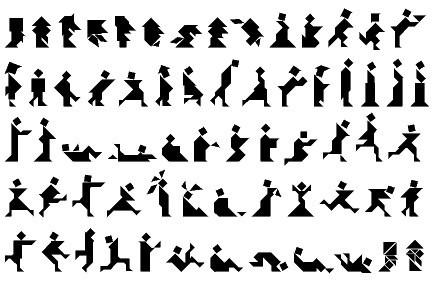 | ||
| With Tangrams, the objects you can make are endless! |
Stay Effective!
Like these posts? Feel free to follow or subscribe to avoid missing one!
Wednesday, April 10, 2013
Clickers in the Classroom
Today we are going to be taking a closer look at clickers in the classroom. There are a lot of types of clickers out there and we will go into the details of types of clickers at a later time, but right now I want to focus on the effectiveness of these great devices.
First off, clickers are a simple idea that provides many wonderful opportunities in the classroom. Clickers are designed to give the teacher (and students) instant feedback on his or her understanding of the topic(s). It is an amazing tool because students love being able to point and click to the receiver in the room and love to see if they are doing the problems correctly or know the information.
Clickers can be used for a lot of different ideas. Here are a list of the few main concepts for clickers.
1) A pre and post test that can be done in 10-15 minutes of class to see what students may already know before starting a unit and then be able to see the students' growth from the post clicker test. A bonus is that students don't feel that it is a test and will relax and really show you what they know!
2) Teaching a new topic? Why not incorporate your notes onto a powerpoint or other slideshow that works with the clickers, teach a concept and then have the students use the clickers after a new topic was taught to see if they are understanding. Perhaps provide an award idea that if you maintain an 80% over so many checks that they can earn a ticket towards the iPad time (See the 1 iPad Classroom Series).
3) Use for a review game...how great could it be for ask the audience?
I started using clickers as a way to engage my students longer on math problems. I teach for 90 minutes, middle schoolers and 90 minutes is a long time! When we bring out the clickers, it is like an amazing reset on class, where the students are refreshed and ready to do more problems even though 2 minutes ago they were burnt out.
I run a Funday Friday idea, where we review a previous topic and students receiving above an 80% are considered proficient on that topic and earn some time in our technology room, which features iPads and computers. Students not at that proficient mark work on a mini-lesson with myself that reflects the topic used with the clickers. It is not seen as a punishment, just as a reward which is really neat to experience, plus some topics you can cut your class in half!
Our next blog will feature how to effectively use the data from clickers to assess your teaching abilities and student growth.
First off, clickers are a simple idea that provides many wonderful opportunities in the classroom. Clickers are designed to give the teacher (and students) instant feedback on his or her understanding of the topic(s). It is an amazing tool because students love being able to point and click to the receiver in the room and love to see if they are doing the problems correctly or know the information.
Clickers can be used for a lot of different ideas. Here are a list of the few main concepts for clickers.
1) A pre and post test that can be done in 10-15 minutes of class to see what students may already know before starting a unit and then be able to see the students' growth from the post clicker test. A bonus is that students don't feel that it is a test and will relax and really show you what they know!
2) Teaching a new topic? Why not incorporate your notes onto a powerpoint or other slideshow that works with the clickers, teach a concept and then have the students use the clickers after a new topic was taught to see if they are understanding. Perhaps provide an award idea that if you maintain an 80% over so many checks that they can earn a ticket towards the iPad time (See the 1 iPad Classroom Series).
3) Use for a review game...how great could it be for ask the audience?
I started using clickers as a way to engage my students longer on math problems. I teach for 90 minutes, middle schoolers and 90 minutes is a long time! When we bring out the clickers, it is like an amazing reset on class, where the students are refreshed and ready to do more problems even though 2 minutes ago they were burnt out.
I run a Funday Friday idea, where we review a previous topic and students receiving above an 80% are considered proficient on that topic and earn some time in our technology room, which features iPads and computers. Students not at that proficient mark work on a mini-lesson with myself that reflects the topic used with the clickers. It is not seen as a punishment, just as a reward which is really neat to experience, plus some topics you can cut your class in half!
Our next blog will feature how to effectively use the data from clickers to assess your teaching abilities and student growth.
Sunday, April 7, 2013
The 1 iPad Classroom (Introduction)
 I use my iPad in and out of my classroom on a daily basis. Whether it is going over notes, engaging students, motivating students, or writing my own apps for students to use. Many teachers have asked for my help in using their iPad more effectively in the classroom.
After sharing how I use my iPad, I usually end up showing teachers how to sync your iPad to your computer and teach from it. After helping multiple teachers in my district, I have found myself looking for more ways to effectively use a single iPad in the classroom. This first series of the blog will be covering the following questions.
1) How do I keep it fair when sharing with 20-30 students
2) Are there activities that partners or groups can use an iPad?
3) How do I know students will do what is expected (holding students accountable)?
4) How can I use the iPad to motivate student learning and growth?
4) How can I use the iPad to motivate student learning and growth?
5) I have my personal e-mail set-up on my iPad, how can I make sure the students don't get into my personal account?
Subscribe to:
Posts (Atom)