Showing posts with label Clickers. Show all posts

Wednesday, April 17, 2013

Being Prepared...Technology Malfunctions

One of the biggest issues with technology is the risk factor of things not working. On multiple accounts, I have had a lot happen to me.

One day, my smartboard stopped working with my computer, I was forced to write on a side whiteboard, because I couldn't work on the board. Basically I had my class turn their desks to face the side of my room and I went with the flow.


Another time my LCD projector's bulb burned out. It made the loudest pop possible and was out of commission for several days. I was lucky enough to have our tech person sign me out another projector in which I rigged it to a card table, but with cable restrictions, it was angled oddly at my board. Did it work...yes, was it the desirable...no...actually my eyes would hurt from the angle alone.

Sometimes my iPad is having issues syncing to my computer and it requires that I teach at the front of the room. Sometimes one of the clickers I use doesn't work and I have to give a student a paperclick to click in their answers.

Flexibility is the name of the game when it comes to technology. It is great to have, but you can't always count on it working. Ever need to make a copy and the copier was down? You managed to get through that day somehow.

Activities can be spiced up by creating
an objective
I recommend some generic back-up plans in case you need something to fall back to. I respect my students enough to ensure that they are always engaged and learning from bell to bell. Often, I take old state tests and convert them to mini-station activities that students can participate in. I also make my own questions, print them on colored construction paper and call it the rainbow activity, where the students must collect one of each color and make a rainbow (done by answering questions)

Having a back-up is essential. To wrap-up, usign technology effectively is important, but also using your time effectively is just as important, being prepared with some back-up activities will make or break your use as an effective and innovative educator.

As always,
Stay Effective!

Don't miss you, follow or subscribe via e-mail to stay up to date! 


Thursday, April 11, 2013

The Clicker Games

In our previous posts, we have discussed using clickers for the educational stand point of effective data and how to appropriately use our clickers to engage students through formal assessments.

Let's not take a look at some ideas of how we can incorporate clickers into lessons, reviews, and games.

For English/Writing

Ideas modified from games I enjoy. This one is similar to apples to apples, but somewhat in reverse. Have on the board the ability to select Option 1 through Option (however many groups you want) + 1.


Call out a word that the students do not know and each group is responsible for writing a definition for that word similar to how a dictionary would write it. The teacher at this time also writes on a card the correct definition. The teacher then reads all the definitions in an order and each individual student chooses which definition (based on the options) is the best one. Students choosing the correct one can score a point and to promote higher thinking, students that's option was selected most also earns a point.

Most Subjects

At the summer camp I work at during summers, we also introduced our staff using two truths and a lie, where you share two things that are true and one that is a lie and the group has to try to guess what the lie is. Clicker version means that you give each student a question and they are responsible for writing things about that topic or question where 2 of them are true and 1 is false. You can then read them out loud and students will choose 1, 2, or 3 as the lie. In math I can see this useful with properties of shapes such as angles, congruent sides and so on.


Review Game

Ever watch the show 1 vs 100? Basically, a question is asked, the crowd answers it and if the one person can't answer the question then the crowd wins the money. In this version you can have one lucky student answer the questions in the front of the room like a game show host, then the crowd could answer then the one person answers. Winners earn whatever prize you might have.

Every watch who wants to be a millionaire? Well you can do the same idea similar to 1 vs 100 except that the objective as a whole is to get to the million dollar question, so when asking the crowd the students want to help as much as possible.


In the end, there are a lot of options out there when it comes to clickers and activities you can do with them. Clickers are great for getting quick data on where your students are at or if a lesson worked the way it was planned. Clickers are naturally engaging and provide a sort of "reset" when changing the pace of the class. If you have not yet used these great devices, I encourage all to give them a try.

Yes, if requires a bit of work to set up and get the slides working properly, but if you make them well enough, making the slides could be a simple 1 time thing.

Stay Effective!

Wednesday, April 10, 2013

Using Clickers to Assess Performance

I'm not sure about everyone's school, but it seems to me that a lot of schools are pushing for data. Data to show you are an effective teacher, that your students are growing a minimum years growth. How in the world are you suppose to do that?

The receiver in my room
Well...clickers can be part of the solution. I use my clickers for a lot of different activities, but one thing use them for is to show student growth. Before every chapter I give a 9-12 question pre-test with multiple choice answers. After the chapter, I give the students the same test (answers are moved around), but as a post-test. I can then show growth through percent of change or the student growth index. To see how to calculate these things, please view the bottom of this post.

Types of clickers used in the classroom
By asking the same questions, I can record loads of data, such as overall scores, where do my special ed, English language learners compare, as well as any other group breakdown that I want to take the time to do. Not only do I see the class growth as a whole as we go along the chapter, but I also see individual data after the clicker test. My students take the post-test with clickers a day before the chapter test. Afterwards, my students have an assignment to work on, such as a study guide, in which during this time, I call students up one at a time, go through their results and discuss what they should do this evening to prepare for the test. This provides an amazing differentiation opportunity, as well as gives me this really neat one on one time with my students.

By all means, I am not a data hog, I believe there is a thing as to much data, but gathering data from time to time that can truly improve instruction is key and clickers provide a fun way for the students and an easy way for the teacher to get that key data required.

The bottom of this post are the equations to calculate various types of growth.

Percent of Change - Calculates the percent of growth from pre to post
(Post Score - Pre Score)/Pre Score...then multiply by 100 to get the percent.

Student Growth Index - Calculates the students potential growth, instead of actual growth
preGrowth = Total Points on Test - Pre Score
postGrowth = Total Points on Test - Post Score

(Post Growth - PreGrowth)/Pre Growth...then multiply by 100 to get the percent.


Stay Effective!

Clickers in the Classroom

Today we are going to be taking a closer look at clickers in the classroom. There are a lot of types of clickers out there and we will go into the details of types of clickers at a later time, but right now I want to focus on the effectiveness of these great devices.

First off, clickers are a simple idea that provides many wonderful opportunities in the classroom. Clickers are designed to give the teacher (and students) instant feedback on his or her understanding of the topic(s). It is an amazing tool because students love being able to point and click to the receiver in the room and love to see if they are doing the problems correctly or know the information.

Clickers can be used for a lot of different ideas. Here are a list of the few main concepts for clickers.

1) A pre and post test that can be done in 10-15 minutes of class to see what students may already know before starting a unit and then be able to see the students' growth from the post clicker test. A bonus is that students don't feel that it is a test and will relax and really show you what they know!

2) Teaching a new topic? Why not incorporate your notes onto a powerpoint or other slideshow that works with the clickers, teach a concept and then have the students use the clickers after a new topic was taught to see if they are understanding. Perhaps provide an award idea that if you maintain an 80% over so many checks that they can earn a ticket towards the iPad time (See the 1 iPad Classroom Series).

3) Use for a review game...how great could it be for ask the audience?


I started using clickers as a way to engage my students longer on math problems. I teach for 90 minutes, middle schoolers and 90 minutes is a long time! When we bring out the clickers, it is like an amazing reset on class, where the students are refreshed and ready to do more problems even though 2 minutes ago they were burnt out.

I run a Funday Friday idea, where we review a previous topic and students receiving above an 80% are considered proficient on that topic and earn some time in our technology room, which features iPads and computers. Students not at that proficient mark work on a mini-lesson with myself that reflects the topic used with the clickers. It is not seen as a punishment, just as a reward which is really neat to experience, plus some topics you can cut your class in half!

Our next blog will feature how to effectively use the data from clickers to assess your teaching abilities and student growth.

Sunday, April 7, 2013

What is Effective Technology?

We will be spending a lot of time taking a look at effective technology. I believe before we begin it is important that we take the time to define effective technology.

When I write about effective technology, I am referring to using technology, not because you can, but because it will enhance your lesson in dynamic ways. Teaching should never be static and technology provides multiple ways to avoid static teaching. Effective technology is all about making life easier in the classroom and keeping students engaged on a topic through interactive, fun, and educational activities.

In this blog, we will be sharing ideas for technology use in the classroom, review of apps for all grade levels and subjects, and share experiences of when technology fails...how you can have easy back-ups in place.


Saturday, April 6, 2013

3 Effective Technologies for the Classroom

Mission and Objective: This blog is dedicated to provide opportunities, suggestions, and ideas to help teachers, administrators, and anyone else that believes that effective technology use is key to reaching the new generation of students.

As a teacher myself (Middle School Math), I use technology to free me in the classroom. I use my iPad to teach from the back of the room or anywhere I would like to go. The app that I primarily use to annotate on my iPad to my projector is called SplashTop Whiteboard.

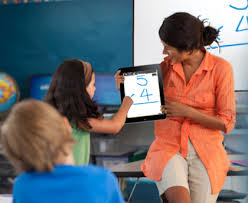
Solving a problem on the iPad, shows up on the board
SplashTop Whiteboard


Splashtop allows the user to sync their iPad to their computer (or any computer that is logged in through  g-mail.) Every once in a while I leave the file I need on my home computer and in an instant I can log into my computer from school to home and drag the file into dropbox. All of a sudden I can now reach my file from my school computer.
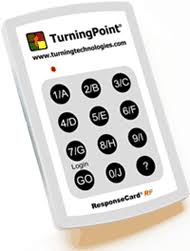


Turning Point Clickers
Along with using the iPad to go over notes, I use clickers to assess students with a pre and post test for each chapter. I also create a few questions that go with each set of notes and I can do an instant quick check to see if students are learning.


Clickers provides a lot of feedback in a moments time, which is amazing, depending on what program, it will also spit out a lot of useful data to help you track your students growth. Anyone not using this technology should really consider giving these a try. The initial setup can be a little stressful, but the rewards afterwards pay off that stress extremely fast.


The last effective strategy I will be sharing today is the use of apps. There are some amazing apps out there for math, but I find it hard to find
engaging math apps that go over the topics discussed in middle school math, including Pythagorean theorem, graphing, algebra, and geometry. I have dedicated the last half of a year creating my very own math app called WileD Math.

WileD Math

This app is designed for students to try those challenging problems and afterwards, the students can spend credits to play the fun little mini-games where the objective is to earn the highest score possible.

I consider this app an effective use of technology because I can have half of my students working on problems we learned in class and the other half can spend some time one on one with myself, where I can really focus on their math skills or spend time developing a new, more complex skill. The app provides breakdown on student results, which means I can take it out of a grade if I wanted to. Every question on the app is self generating, which means their is an unlimited amount of questions that can occur. Problems are written in multiple ways and the app is currently expanding and meeting needs in all areas.


In short, technology is the way of the generation of students we are having. It is time for teachers to begin adopting effective technology in the room to promote critical thinking and higher levels of engagement. Technology by itself is not beneficial in the classroom, rather technology used in conjunction with sound lessons where the technology provides perks including instant feedback, higher levels of engagement, interactions, or a combination of everything.